> ## Documentation Index
> Fetch the complete documentation index at: https://www.sip.tg/llms.txt
> Use this file to discover all available pages before exploring further.
# Softphone Setup
export const bot = {
ACTIVATE_TARIFF_PLAN: "Activate subscription",
ADDRESS: "Address",
ADDRESS_PORT: "Address:port",
ADMIN_ASSIGN: "Assign administrator",
APPLY: "Apply",
ARBITRARY_CHECK: "Messages processing",
AUTORENEW: "Auto renewal",
AUTOREPLY: "Autoreply",
BACK: "Back",
BACK_TO_PAYMENT: "Back to payment",
BALANCE_TRANSFER: "Transfer",
BILLING: "Billing",
BTN_CHARGE_REDIRECT: "Confirm charge",
BTN_EMPTY_BOT: "Inline bot",
BTN_TARIFF_NEW: "Activate",
CALLBACK_CHECK: "Callback",
CALLBACK_SWITCH_OFF: "Switch off Callback mode",
CALLBACK_SWITCH_ON: "Switch on Callback mode",
CALLER_NAME: "Caller name",
CALLER_PHONE: "Caller phone",
CANCEL: "Cancel",
COMMENT: "Comment",
CONFIGURE_ACCOUNT_ALLOW_EVERYBODY: "Allow calls from all users",
CONFIGURE_ACCOUNT_ALLOW_P2P: "Allow P2P calls from everybody",
CONFIGURE_ACCOUNT_DISALLOW_GROUPS: "Disallow adding to groups",
CONFIGURE_ACCOUNT_OFF_OTHER_SESSIONS_CALLS: "Disable calls on other devices",
COUNTRY: "Country",
DELETE: "Delete",
DESCRIPTION: "Description",
DIAL_RULES: "Dial Rules",
DOC_BTN_PROVIDE: "Provide documentation",
DOMAIN: "Domain",
DTMF_METHODS: "DTMF Methods",
FIELD_VALUE: "Field:Value",
FORMATS: "Audio Codecs",
FW_ADD: "Add phone number",
FW_ADD_OTHER: "Other number",
FW_ADD_SELF: "Telegram number",
FW_ANTISPAM: "Anti-spam",
FW_BACK: "Back",
FW_BONUS_PROGRAM: "Referral program",
FW_CANCEL: "Cancel",
FW_DELETE: "Delete",
FW_NAME: "Name",
FW_NO: "No",
FW_PHONE_FORWARDING: "Remind number",
FW_RECORDER_CHAT: "Chat for recordings",
FW_RECORDER_CHECKBOX: "Call recording",
FW_SELECT_COUNTRY: "Choose country (region)",
FW_SHARE_PHONE: "Send phone number",
FW_TELL_FRIENDS: "Tell friends",
FW_YES: "Yes",
GATEWAY_IN_RESET: "Reset Password",
GATEWAY_IN_SHOW: "Show Account",
GATEWAY_OUT_NUMBER: "Number on PBX",
GENERATE_NEW: "Generate new",
GIVE_ACCESS: "Give the access",
GIVE_PHONE_NUMBER: "Give phone number",
HELP: "Help",
INLINE_QUERY: "Inline query",
INVOICE_BANK_IGNORE_CURRENT_RATE: "Ignore currency rate",
KEYPAD_IN: "DTMF In",
KEYPAD_OUT: "DTMF Out",
KEYS_GET: "Get Keys",
KEYS_RESET: "Reset Keys",
LEARN_ABOUT: "Learn about SIP.TG",
LINES: "Lines",
LINES_CHECK: "Lines",
LOGIN: "Login",
MANUAL: "Manual",
MODE_GATEWAY: "Gateway mode",
MODE_SOFTPHONE: "Softphone mode",
NAME: "Name",
NEW: "New",
NEW_IN: "🆕 PBX→SIP․TG",
NEW_IP: "🆕 IP⇿IP",
NEW_OUT: "🆕 SIP․TG→PBX",
NO: "No",
PARALLEL_DECLINE: "Decline",
PARALLEL_END: "End",
PARALLEL_SWITCH: "Switch",
PARALLEL_TRANSFER: "Transfer",
PASSWORD: "Password",
PAYER: "Payer",
PAYSYSTEM_BTN_VERIFY: "Specify country of residence",
PAYSYSTEM_DOCS_PROVIDE: "Provide documents",
PAYSYSTEM_METHOD: "Payment method",
PAY_TARIFF: "Pay",
PROLONG: "Renew",
PROMO_BUTTON_EMPTY: "Discount code",
RECONNECT: "🔄 Reconnect",
RECORDER_ACTIVATE: "🔴 Start recording",
RECORDER_ACTIVATE_FAILED: "⚠️ Start recording",
RECORDER_CHAT: "Chat for recordings",
RECORDER_CHECKBOX: "Call recording",
RECORDER_DEACTIVATE: "🟥 Stop recording",
RECORDER_DEACTIVATE_RECONNECTING: "⌛ Stop recording",
RECORDER_LOCKED: "🔒 Recording locked",
REDIAL: "Redial",
REDIAL_CHECK: "Redial",
REGISTRAR: "Proxy",
REPEAT: "Repeat",
SELECT_BOT: "Select bot",
SELECT_CHANNEL: "Select channel",
SELECT_CHAT: "Select chat",
SELECT_USER: "Select user",
SERVER_FROM_TEMPLATE: "Settings templates",
SESSION_BILLER_CHECK: "Use a shared subscription",
SESSION_CONFIGURE_ACCOUNT: "Configure Telegram account",
SESSION_LOGIN: "Connect",
SESSION_LOGOUT: "Disconnect",
SETTINGS: "Settings",
START_CALLING: "Go to calls",
SUPPORT: "Support",
SWITCH_OFF: "Switch off",
SWITCH_ON: "Switch on",
TAKE: "Take",
TARIFF_ACTIVATE_CHANGE_USER: "Change customer",
TARIFF_ACTIVATE_USER: "Activate for customer",
TARIFF_ACTIVATE_YOURSELF: "Activate yourself",
TAX_ADDRESS: "Address",
TAX_BUSINESS: "Business",
TAX_NAME: "Buyer",
TAX_NUMBER: "Tax number",
TERMINATE_SESSION: "Terminate the session",
TERMS_AGREE: "Agree with Terms and Conditions",
TG_STORAGE_OFFICIAL: "✅ SIP․TG Sessions Storage",
TRANSFER: "Transfer",
TRANSFER_BACK: "Transfer back",
TRUSTED_IPS: "Trusted IPs",
UNLINK: "Unlink",
USER: "User",
VERIFY_ROUTE_BAD: "👎 No, it's spam",
VERIFY_ROUTE_GOOD: "👍 Yes, all good",
VERIFY_ROUTE_RECOVER: "Recover incoming calls",
WORKER_AUTO: "Auto",
YES: "Yes"
};
## Owner and user roles of SIP account
**SIP account Owner** — a Telegram user who creates a SIP account in the [@siptg\_bot](https://t.me/siptg_bot?start=utm_docs) bot. The owner has full control over creating, deleting, and changing SIP account settings, and can also assign accounts to other users.
**SIP account User** — a person to whom the owner has assigned a SIP account. They can use the account to make and receive calls, but cannot change the settings of the account itself.
The subscription for the softphone must be activated to the Telegram account of the **Owner**. The user's subscription has no effect on SIP accounts that belong to other owners!
## Principle of interaction with settings buttons
Most settings are displayed directly on the buttons in the form of current values. To change these settings, simply press the corresponding button and enter a new value as requested by the bot.
However, some buttons work differently:
* **Worker**: when pressed, a list of available Worker servers appears. Select the desired server from the list to assign it.
* **Buttons with checkboxes**: such as "Call Recording", work as toggles. One press activates or deactivates the option.
* **{bot.RECORDER_CHAT}**: when pressed for the first time, an additional button for selecting a chat will appear. By pressing this button, you will see a list of chats and channels available for selection. Choose a suitable chat for call recordings to be saved there.
* **{bot.USER}**: when pressed for the first time, an additional button for selecting a user will appear. By pressing this button, you can select another Telegram user to whom this SIP account will be assigned.
* **Connection protocol (UDP/TCP/TLS)**: each press switches to the next available protocol.
## Step by step setup
* Launch the [@siptg\_bot](https://t.me/siptg_bot?start=utm_docs) bot.
* Go to the `/softphone` section.
* Press the **{bot.NEW}** button to create a new SIP account.
* Enter the login and password received from your IP telephony provider or SIP PBX.
Don't use your login and password simultaneously in multiple programs (widgets, other softphones, or telephones). This can result in lost incoming calls and is due to the nature of the SIP protocol. You must create a separate SIP account in your PBX for each program (device).
* Specify the domain (SIP server address).
* If necessary, specify a separate Registrar Proxy (registration server).
* Prepared settings of the IP telephony operator can also be selected from the catalog, which is accessible via the **{bot.SERVER_FROM_TEMPLATE}** button.
* Select the transport protocol: UDP, TCP, or TLS.
* Select and configure audio codecs supported by your provider.
* Configure the DTMF signal transmission method (RFC2833, INFO, inband).
* Set rules for transforming numbers for outgoing calls.
* Check in the SIP provider/PBX account that the account is registered.
* Try an outgoing call (send a number to the [@siptg](https://t.me/siptg) chat).
* If everything is well, try an incoming call (to the SIP account number).
* For authorization errors or problems, see [Troubleshooting](/en/docs/softphone/problems).
* If necessary, so that calls go not to you but to another employee, assign a Telegram user to this SIP account (button **{bot.USER}**).
* Now all calls will go to the employee, and you will receive notifications if there is a problem with the SIP account.
* **{bot.RECORDER_CHECKBOX}**: enable the option and select a chat for storing recordings.
* **{bot.DIAL_RULES}**: for changing the format of the dialed number (for example, +7 → 8).
Some settings take effect after pressing the **{bot.APPLY}** button, or after 5 minutes. After completing the steps, the account will become active and ready to work.
## Available settings
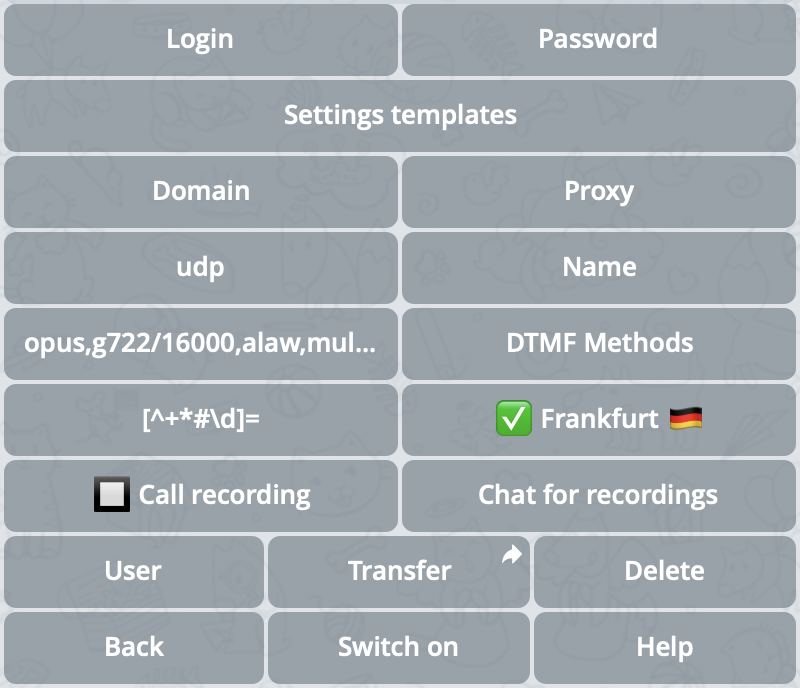 The choice of codecs affects the quality and compatibility of voice communication. Opus, alaw, mulaw, GSM, and other codecs are supported.
DTMF is necessary for interacting with voice menus. Available methods are RFC2833 (recommended), INFO, and inband.
You can activate or deactivate automatic call recording, and also select a separate chat or channel for saving audio recordings.
Allows assigning SIP accounts to other Telegram users, giving them the ability to use accounts for calls without access to settings.
Allows you to select the server that will connect to the PBX or telephony provider.
There are 4 types of servers:
| Server type | Description | Designation |
| ----------------------------------- | ------------------------------------------------------------------------- | ----------- |
| SIP.TG public servers | Main servers supported by SIP.TG | ✅ |
| Public servers of other users | Publicly available servers hosted by other users | 🌐 |
| Public servers of telecom providers | Available with some Settings Templates, provided by third-party providers | 📡 |
| Private servers | Your own servers, available only for your SIP accounts | 🔑 |
On a free subscription, only some of the SIP.TG public servers are available.
Allow transforming the number for an outgoing call before sending it to the SIP provider or PBX, as well as removing unsuitable SIP accounts from the line selection request for a call (for example, if you prefer to make calls to different countries through different SIP accounts).
See the detailed description in the [Transforming outgoing numbers](#dialing-rules) section.
## Transforming outgoing numbers
Sometimes for outgoing calls, it's necessary to automatically change the dialed number to meet the requirements of the SIP provider or PBX (for example, replace the first "8" with "+7" or remove spaces and brackets). In SIP.TG, this is configured using **Transformation Rules** in the SIP account settings.
If your provider accepts numbers in any format or you're using a ready-made **Settings Template**, dialing rules are most likely not needed. Before making changes, check the requirements for the number format with your SIP provider or within the PBX.
There are 2 types of rules:
* **Rules with "="** — replacing part of the number.\
If the left part of the rule (regular expression) is found, it's replaced with the right part.
* **Rules without "="** — filter (mask).\
If the number doesn't match the regular expression, the rule interrupts processing, and the call is not made.
All rules are separated by spaces and applied in sequence. As soon as the number stops matching even one filter rule (without "="), the use of the SIP account for calling that number is not allowed. Each replacement rule (with the "=" sign) changes the number before it's checked by the following filter rules.
### Editing rules in the bot
1. In the [@siptg\_bot](https://t.me/siptg_bot?start=utm_docs) bot, go to the `/softphone` section.
2. Select the desired SIP account, press the **{bot.DIAL_RULES}** button.
3. Enter one or more rules, separating them with spaces.
4. Confirm the changes.
5. Check with a test call that the numbers are transformed correctly.
All rules work on the "left to right" principle. Note that adding too many filters or ambiguous replacements can lead to unexpected results. For complex scenarios, test with a couple of real numbers.
### Examples
Let's consider the task: we dial numbers like "8 (926) 123-45-67", but the provider requires "7XXXXXXXXXX".
Suppose we need to remove all non-digit symbols and turn the prefix 8 into 7.
Here are two rules (written with a space):
```text theme={null}
[^+*#\w]= ^8=7
```
**The first** removes all characters except digits, letters, plus, and some special characters (\*, #, \_).\
**The second** replaces the first digit 8 with 7.
Now if the user enters `8 (926) 123-45-67`, after the first rule the string will become `89261234567`, and after the second — `79261234567`.
If you need to allow outgoing calls only to Russian mobile numbers (starting with 79 and then 9 digits), use a filter rule:
```text theme={null}
^79\d{9}$
```
Without the "=" sign. If the number doesn't match `^79\d{9}$`, the SIP account won't be used.
Sometimes you need to discard everything if the user accidentally entered an invalid number. You can use a replacement rule to empty:
```text theme={null}
.*=
```
This will cause any number to be replaced with an empty string. If an empty string doesn't suit the operator, the call won't happen.
If you encounter problems or errors, see [Troubleshooting](/en/docs/softphone/problems).
The choice of codecs affects the quality and compatibility of voice communication. Opus, alaw, mulaw, GSM, and other codecs are supported.
DTMF is necessary for interacting with voice menus. Available methods are RFC2833 (recommended), INFO, and inband.
You can activate or deactivate automatic call recording, and also select a separate chat or channel for saving audio recordings.
Allows assigning SIP accounts to other Telegram users, giving them the ability to use accounts for calls without access to settings.
Allows you to select the server that will connect to the PBX or telephony provider.
There are 4 types of servers:
| Server type | Description | Designation |
| ----------------------------------- | ------------------------------------------------------------------------- | ----------- |
| SIP.TG public servers | Main servers supported by SIP.TG | ✅ |
| Public servers of other users | Publicly available servers hosted by other users | 🌐 |
| Public servers of telecom providers | Available with some Settings Templates, provided by third-party providers | 📡 |
| Private servers | Your own servers, available only for your SIP accounts | 🔑 |
On a free subscription, only some of the SIP.TG public servers are available.
Allow transforming the number for an outgoing call before sending it to the SIP provider or PBX, as well as removing unsuitable SIP accounts from the line selection request for a call (for example, if you prefer to make calls to different countries through different SIP accounts).
See the detailed description in the [Transforming outgoing numbers](#dialing-rules) section.
## Transforming outgoing numbers
Sometimes for outgoing calls, it's necessary to automatically change the dialed number to meet the requirements of the SIP provider or PBX (for example, replace the first "8" with "+7" or remove spaces and brackets). In SIP.TG, this is configured using **Transformation Rules** in the SIP account settings.
If your provider accepts numbers in any format or you're using a ready-made **Settings Template**, dialing rules are most likely not needed. Before making changes, check the requirements for the number format with your SIP provider or within the PBX.
There are 2 types of rules:
* **Rules with "="** — replacing part of the number.\
If the left part of the rule (regular expression) is found, it's replaced with the right part.
* **Rules without "="** — filter (mask).\
If the number doesn't match the regular expression, the rule interrupts processing, and the call is not made.
All rules are separated by spaces and applied in sequence. As soon as the number stops matching even one filter rule (without "="), the use of the SIP account for calling that number is not allowed. Each replacement rule (with the "=" sign) changes the number before it's checked by the following filter rules.
### Editing rules in the bot
1. In the [@siptg\_bot](https://t.me/siptg_bot?start=utm_docs) bot, go to the `/softphone` section.
2. Select the desired SIP account, press the **{bot.DIAL_RULES}** button.
3. Enter one or more rules, separating them with spaces.
4. Confirm the changes.
5. Check with a test call that the numbers are transformed correctly.
All rules work on the "left to right" principle. Note that adding too many filters or ambiguous replacements can lead to unexpected results. For complex scenarios, test with a couple of real numbers.
### Examples
Let's consider the task: we dial numbers like "8 (926) 123-45-67", but the provider requires "7XXXXXXXXXX".
Suppose we need to remove all non-digit symbols and turn the prefix 8 into 7.
Here are two rules (written with a space):
```text theme={null}
[^+*#\w]= ^8=7
```
**The first** removes all characters except digits, letters, plus, and some special characters (\*, #, \_).\
**The second** replaces the first digit 8 with 7.
Now if the user enters `8 (926) 123-45-67`, after the first rule the string will become `89261234567`, and after the second — `79261234567`.
If you need to allow outgoing calls only to Russian mobile numbers (starting with 79 and then 9 digits), use a filter rule:
```text theme={null}
^79\d{9}$
```
Without the "=" sign. If the number doesn't match `^79\d{9}$`, the SIP account won't be used.
Sometimes you need to discard everything if the user accidentally entered an invalid number. You can use a replacement rule to empty:
```text theme={null}
.*=
```
This will cause any number to be replaced with an empty string. If an empty string doesn't suit the operator, the call won't happen.
If you encounter problems or errors, see [Troubleshooting](/en/docs/softphone/problems).