> ## Documentation Index
> Fetch the complete documentation index at: https://www.sip.tg/llms.txt
> Use this file to discover all available pages before exploring further.
# Interaction with Telegram
export const bot = {
ACTIVATE_TARIFF_PLAN: "Activate subscription",
ADDRESS: "Address",
ADDRESS_PORT: "Address:port",
ADMIN_ASSIGN: "Assign administrator",
APPLY: "Apply",
ARBITRARY_CHECK: "Messages processing",
AUTORENEW: "Auto renewal",
AUTOREPLY: "Autoreply",
BACK: "Back",
BACK_TO_PAYMENT: "Back to payment",
BALANCE_TRANSFER: "Transfer",
BILLING: "Billing",
BTN_CHARGE_REDIRECT: "Confirm charge",
BTN_EMPTY_BOT: "Inline bot",
BTN_TARIFF_NEW: "Activate",
CALLBACK_CHECK: "Callback",
CALLBACK_SWITCH_OFF: "Switch off Callback mode",
CALLBACK_SWITCH_ON: "Switch on Callback mode",
CALLER_NAME: "Caller name",
CALLER_PHONE: "Caller phone",
CANCEL: "Cancel",
COMMENT: "Comment",
CONFIGURE_ACCOUNT_ALLOW_EVERYBODY: "Allow calls from all users",
CONFIGURE_ACCOUNT_ALLOW_P2P: "Allow P2P calls from everybody",
CONFIGURE_ACCOUNT_DISALLOW_GROUPS: "Disallow adding to groups",
CONFIGURE_ACCOUNT_OFF_OTHER_SESSIONS_CALLS: "Disable calls on other devices",
COUNTRY: "Country",
DELETE: "Delete",
DESCRIPTION: "Description",
DIAL_RULES: "Dial Rules",
DOC_BTN_PROVIDE: "Provide documentation",
DOMAIN: "Domain",
DTMF_METHODS: "DTMF Methods",
FIELD_VALUE: "Field:Value",
FORMATS: "Audio Codecs",
FW_ADD: "Add phone number",
FW_ADD_OTHER: "Other number",
FW_ADD_SELF: "Telegram number",
FW_ANTISPAM: "Anti-spam",
FW_BACK: "Back",
FW_BONUS_PROGRAM: "Referral program",
FW_CANCEL: "Cancel",
FW_DELETE: "Delete",
FW_NAME: "Name",
FW_NO: "No",
FW_PHONE_FORWARDING: "Remind number",
FW_RECORDER_CHAT: "Chat for recordings",
FW_RECORDER_CHECKBOX: "Call recording",
FW_SELECT_COUNTRY: "Choose country (region)",
FW_SHARE_PHONE: "Send phone number",
FW_TELL_FRIENDS: "Tell friends",
FW_YES: "Yes",
GATEWAY_IN_RESET: "Reset Password",
GATEWAY_IN_SHOW: "Show Account",
GATEWAY_OUT_NUMBER: "Number on PBX",
GENERATE_NEW: "Generate new",
GIVE_ACCESS: "Give the access",
GIVE_PHONE_NUMBER: "Give phone number",
HELP: "Help",
INLINE_QUERY: "Inline query",
INVOICE_BANK_IGNORE_CURRENT_RATE: "Ignore currency rate",
KEYPAD_IN: "DTMF In",
KEYPAD_OUT: "DTMF Out",
KEYS_GET: "Get Keys",
KEYS_RESET: "Reset Keys",
LEARN_ABOUT: "Learn about SIP.TG",
LINES: "Lines",
LINES_CHECK: "Lines",
LOGIN: "Login",
MANUAL: "Manual",
MODE_GATEWAY: "Gateway mode",
MODE_SOFTPHONE: "Softphone mode",
NAME: "Name",
NEW: "New",
NEW_IN: "🆕 PBX→SIP․TG",
NEW_IP: "🆕 IP⇿IP",
NEW_OUT: "🆕 SIP․TG→PBX",
NO: "No",
PARALLEL_DECLINE: "Decline",
PARALLEL_END: "End",
PARALLEL_SWITCH: "Switch",
PARALLEL_TRANSFER: "Transfer",
PASSWORD: "Password",
PAYER: "Payer",
PAYSYSTEM_BTN_VERIFY: "Specify country of residence",
PAYSYSTEM_DOCS_PROVIDE: "Provide documents",
PAYSYSTEM_METHOD: "Payment method",
PAY_TARIFF: "Pay",
PROLONG: "Renew",
PROMO_BUTTON_EMPTY: "Discount code",
RECONNECT: "🔄 Reconnect",
RECORDER_ACTIVATE: "🔴 Start recording",
RECORDER_ACTIVATE_FAILED: "⚠️ Start recording",
RECORDER_CHAT: "Chat for recordings",
RECORDER_CHECKBOX: "Call recording",
RECORDER_DEACTIVATE: "🟥 Stop recording",
RECORDER_DEACTIVATE_RECONNECTING: "⌛ Stop recording",
RECORDER_LOCKED: "🔒 Recording locked",
REDIAL: "Redial",
REDIAL_CHECK: "Redial",
REGISTRAR: "Proxy",
REPEAT: "Repeat",
SELECT_BOT: "Select bot",
SELECT_CHANNEL: "Select channel",
SELECT_CHAT: "Select chat",
SELECT_USER: "Select user",
SERVER_FROM_TEMPLATE: "Settings templates",
SESSION_BILLER_CHECK: "Use a shared subscription",
SESSION_CONFIGURE_ACCOUNT: "Configure Telegram account",
SESSION_LOGIN: "Connect",
SESSION_LOGOUT: "Disconnect",
SETTINGS: "Settings",
START_CALLING: "Go to calls",
SUPPORT: "Support",
SWITCH_OFF: "Switch off",
SWITCH_ON: "Switch on",
TAKE: "Take",
TARIFF_ACTIVATE_CHANGE_USER: "Change customer",
TARIFF_ACTIVATE_USER: "Activate for customer",
TARIFF_ACTIVATE_YOURSELF: "Activate yourself",
TAX_ADDRESS: "Address",
TAX_BUSINESS: "Business",
TAX_NAME: "Buyer",
TAX_NUMBER: "Tax number",
TERMINATE_SESSION: "Terminate the session",
TERMS_AGREE: "Agree with Terms and Conditions",
TG_STORAGE_OFFICIAL: "✅ SIP․TG Sessions Storage",
TRANSFER: "Transfer",
TRANSFER_BACK: "Transfer back",
TRUSTED_IPS: "Trusted IPs",
UNLINK: "Unlink",
USER: "User",
VERIFY_ROUTE_BAD: "👎 No, it's spam",
VERIFY_ROUTE_GOOD: "👍 Yes, all good",
VERIFY_ROUTE_RECOVER: "Recover incoming calls",
WORKER_AUTO: "Auto",
YES: "Yes"
};
For the **Gateway** mode to work, you need to connect a regular Telegram account through which calls will pass. **Two roles** are involved in this process: the session and the administrator.
## Session and Administrator Account Roles
* **Session account** — a Telegram account that will be used as a source and receiver of calls. Connected as a **virtual device** to SIP.TG.
* **Administrator account** — a Telegram account that interacts with [@siptg\_bot](https://t.me/siptg_bot?start=utm_docs) and manages the session: connects the session, can change settings, connect SIP-PBX, and receive error notifications.
The same Telegram account can be used in both roles. However, in a corporate environment, it is recommended to separate them.
## Step-by-Step Session Connection
Choose a Telegram account that will be used as a gateway. Make sure it is not used for personal calls or correspondence.
Go to [@siptg\_bot](https://t.me/siptg_bot?start=utm_docs) and execute the `/gateway` command. Click the **{bot.SESSION_LOGIN}** button.
Specify where the session will be stored:
* **{bot.TG_STORAGE_OFFICIAL}** — simple, fast, and secure.
* **Own storage** — for companies with increased privacy requirements. For more details, see [Telegram Session Storage](/en/docs/additional/modules#storage).
Enter the phone number of the selected Telegram account. A code will be sent to it from the official Telegram account, which needs to be entered into the bot for authorization.
If two-factor authentication (2FA) is enabled on the account, a secure recovery process will be initiated: Telegram will send an email to the linked email for password reset. This is done to avoid transmitting your password in plain text.
## Applying Telegram Settings to the Account
Immediately after connecting the session, the bot will offer to apply recommended settings. They enhance the reliability and convenience of receiving calls:
* **{bot.CONFIGURE_ACCOUNT_OFF_OTHER_SESSIONS_CALLS}** — eliminates conflicts when a call arrives simultaneously in multiple places. Allows using the Telegram session as a channel only for calls, and other devices — for correspondence.
* **{bot.CONFIGURE_ACCOUNT_ALLOW_EVERYBODY}** — important, as by default calls from unknown numbers are blocked by Telegram settings and will not reach the PBX.
* **{bot.CONFIGURE_ACCOUNT_ALLOW_P2P}** — if supported, allows Telegram to transmit audio directly, without forwarding through servers, improving call quality and reducing delays.
* **{bot.CONFIGURE_ACCOUNT_DISALLOW_GROUPS}** — reduces the risk of receiving unnecessary notifications unrelated to call tasks.
Some Telegram parameters can only be changed 24 hours after connecting the account. If you get an error — try again later.
## SIP.TG Session Settings
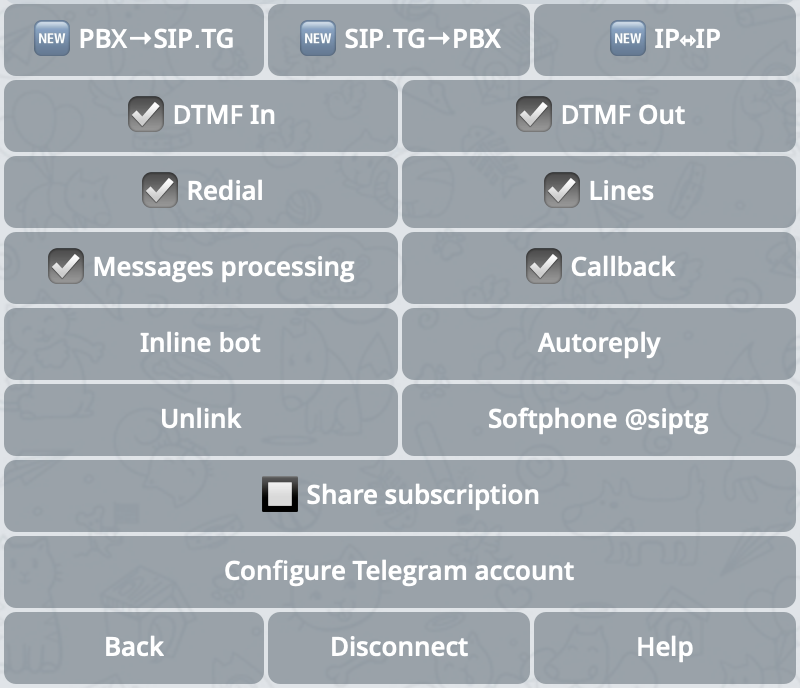 These parameters enable or disable the use of the DTMF keypad in different call directions:
* **{bot.KEYPAD_IN}** — used for incoming Telegram calls (Telegram → SIP direction);
* **{bot.KEYPAD_OUT}** — used for outgoing calls to Telegram from your PBX (SIP → Telegram direction).
The DTMF keypad allows:
* interacting with the PBX voice menu (IVR);
* entering internal numbers;
* displaying information about the calling employee when calling a Telegram user.
The keypad is activated by swiping up during a conversation. Supported transmission modes (RFC2833, inband, SIP INFO) are changed in the SIP connection settings and should be coordinated with the PBX settings.
Enables or disables the **{bot.REDIAL}** and **{bot.LINES}** buttons for Telegram users who interact with the gateway account. The buttons appear in the chat after the call ends.
Clicking the **{bot.REDIAL}** button initiates a call to the internal number in the PBX that was used during the previous conversation, allowing to connect the user with a specific employee or department. The number is sent to the PBX without applying number transformation rules.
The **{bot.LINES}** button works approximately the same with the only difference that before initiating the call, it displays the connected lines through which a call can be made. The number is sent to the PBX after applying the number transformation rules of the selected SIP account.
Enables or disables the ability to react to text messages coming to the session's Telegram account. When enabled, additional functions open up:
* **{bot.CALLBACK_CHECK}** — after sending any message to the chat, the user will receive an incoming call from the gateway with subsequent connection to the number sent in the message (or the default number; behavior is configured in the SIP line settings).
* **{bot.BTN_EMPTY_BOT}** — if a suitable SIP account for calling is not found for the message, it can be processed through an external inline-bot.
* **{bot.AUTOREPLY}** — a predefined template is sent for each message, for example:
> This account is for calls only. For correspondence, use @support\_bot.
These functions can be enabled separately and the behavior can be configured depending on the situation.
* **{bot.UNLINK}** / **{bot.ADMIN_ASSIGN}** — allows removing administrator rights from the current account or assigning another Telegram user as administrator (see [Session and Administrator Account Roles](#roles)).
* **{bot.SESSION_BILLER_CHECK}** — extend the administrator's subscription to this session (see [Session and Administrator Account Roles](#roles) and [Additional sessions](/en/docs/subscriptions/pricing#gateway)).
* **{bot.SESSION_LOGOUT}** — completely remove the virtual device, reset the session, and optionally clear SIP connection parameters.
### Inline-bot
You can connect your own inline-bot that will be used to process incoming messages. This is especially useful in cases where the message cannot be matched with a phone number or a call is not required. The inline-bot can:
* respond with a template;
* collect requests;
* integrate with external systems such as Helpdesk, CRM, etc.
Additionally, you can set the format of the inline-request that will be passed to the bot. This allows structuring the user's request for more accurate processing.
These parameters enable or disable the use of the DTMF keypad in different call directions:
* **{bot.KEYPAD_IN}** — used for incoming Telegram calls (Telegram → SIP direction);
* **{bot.KEYPAD_OUT}** — used for outgoing calls to Telegram from your PBX (SIP → Telegram direction).
The DTMF keypad allows:
* interacting with the PBX voice menu (IVR);
* entering internal numbers;
* displaying information about the calling employee when calling a Telegram user.
The keypad is activated by swiping up during a conversation. Supported transmission modes (RFC2833, inband, SIP INFO) are changed in the SIP connection settings and should be coordinated with the PBX settings.
Enables or disables the **{bot.REDIAL}** and **{bot.LINES}** buttons for Telegram users who interact with the gateway account. The buttons appear in the chat after the call ends.
Clicking the **{bot.REDIAL}** button initiates a call to the internal number in the PBX that was used during the previous conversation, allowing to connect the user with a specific employee or department. The number is sent to the PBX without applying number transformation rules.
The **{bot.LINES}** button works approximately the same with the only difference that before initiating the call, it displays the connected lines through which a call can be made. The number is sent to the PBX after applying the number transformation rules of the selected SIP account.
Enables or disables the ability to react to text messages coming to the session's Telegram account. When enabled, additional functions open up:
* **{bot.CALLBACK_CHECK}** — after sending any message to the chat, the user will receive an incoming call from the gateway with subsequent connection to the number sent in the message (or the default number; behavior is configured in the SIP line settings).
* **{bot.BTN_EMPTY_BOT}** — if a suitable SIP account for calling is not found for the message, it can be processed through an external inline-bot.
* **{bot.AUTOREPLY}** — a predefined template is sent for each message, for example:
> This account is for calls only. For correspondence, use @support\_bot.
These functions can be enabled separately and the behavior can be configured depending on the situation.
* **{bot.UNLINK}** / **{bot.ADMIN_ASSIGN}** — allows removing administrator rights from the current account or assigning another Telegram user as administrator (see [Session and Administrator Account Roles](#roles)).
* **{bot.SESSION_BILLER_CHECK}** — extend the administrator's subscription to this session (see [Session and Administrator Account Roles](#roles) and [Additional sessions](/en/docs/subscriptions/pricing#gateway)).
* **{bot.SESSION_LOGOUT}** — completely remove the virtual device, reset the session, and optionally clear SIP connection parameters.
### Inline-bot
You can connect your own inline-bot that will be used to process incoming messages. This is especially useful in cases where the message cannot be matched with a phone number or a call is not required. The inline-bot can:
* respond with a template;
* collect requests;
* integrate with external systems such as Helpdesk, CRM, etc.
Additionally, you can set the format of the inline-request that will be passed to the bot. This allows structuring the user's request for more accurate processing.